
Have you ever found yourself writing the same lines of code over and over again in your Python scripts? Maybe you’re calculating a value, formatting output, or performing a series of steps that appear in multiple places. As your programs grow, this repetition becomes tedious, error-prone, and incredibly difficult to manage. What if you need to change that calculation or formatting slightly? You’d have to find every instance and update it – a developer’s nightmare!
This is where the power of functions comes in. Functions are one of the most fundamental and important concepts in programming, and mastering them is key to writing efficient, readable, and maintainable Python code.
Think of a function as a mini-program within your main program, or like a specialized machine in a factory. You give it some input (or not), it performs a specific task, and it might give you some output (or not). Once you’ve built this machine, you can use it as many times as you need, whenever you need it, without having to rebuild it from scratch each time.
In this comprehensive guide, we’re going to take a deep dive into Python functions. We’ll start with the basic syntax, immediately see why they are so powerful by comparing code with and without them, explore different ways to pass data using various argument types, understand how functions give back results, demystify the often-confusing concept of variable scope, and learn how to make our functions more understandable using documentation and type hints. Crucially, we’ll cover best practices (the “dos”) and common pitfalls (the “don’ts”), look at real-world use cases, and discuss what makes functions “production-ready” for larger or collaborative projects.
If you’ve just started your Python journey or want to solidify your understanding of functions to write better code, you’re in the right place. Let’s get started!
The Anatomy of a Python Function – Building Your First Machine
At its core, defining a function in Python is straightforward. You use the def keyword, followed by a name for your function, parentheses (), and a colon :. The code block that makes up the function’s body is indented below the definition line.
# This is the function definition
def my_first_function():
    # This is the function body, indicated by consistent indentation
    print("Hello from inside the function!")
    print("This is the second line of the function.")

# The function body ends when the indentation goes back to the previous level
Let’s break this down:
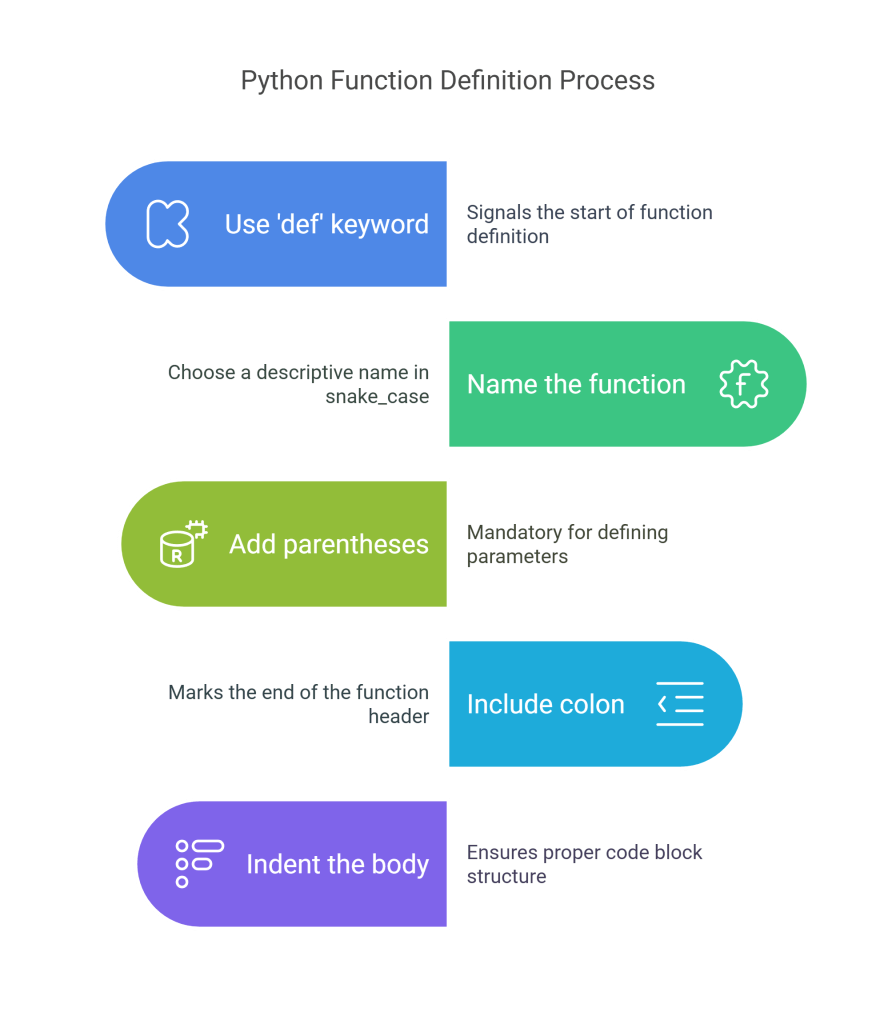
defkeyword: This signals to Python that you are defining a function. It’s short for “define”.my_first_function: This is the name of the function. Function names should be lowercase, with words separated by underscores (snake_case), following Python’s standard style guide, PEP 8. Choose names that are descriptive and indicate the action the function performs. For example,calculate_total,process_data,format_string. Avoid generic names likefunc1,process, orhandler.()(Parentheses): These are mandatory, even if your function doesn’t accept any input data. They are where you define the function’s parameters, which we’ll cover next.:(Colon): This marks the end of the function header and signifies that the indented block of code that follows is the function’s body.- Indentation: All statements belonging to the function’s body must be indented by the same amount (the standard is 4 spaces). This is how Python groups statements together and defines the boundaries of code blocks, including function bodies. Unlike languages like C++ or Java that use curly braces
{}for code blocks, Python relies solely on indentation. Incorrect indentation will lead to aIndentationError.
Defining a function using def doesn’t actually run the code inside it. It merely registers the function name and its associated code block with Python. To execute the instructions contained within the function, you must call or invoke the function.
# Define the function (Python learns about it, but doesn't run the print statement yet)
def say_hello():
    print("Hello!")

print("About to call the function...") # This line runs first

# Call the function - this makes the code inside 'say_hello()' execute
say_hello() # Output: Hello!

print("Function call finished.") # This line runs after the function completes

# You can call the same function multiple times from different places in your code
print("Calling the function again:")
say_hello() # Output: Hello!
This simple example demonstrates the basic structure and, importantly, the concept of reusability. We defined the “print ‘Hello!'” logic once inside say_hello(), and now we can trigger that exact same logic whenever we call say_hello(). Imagine how tedious it would be to write print("Hello!") every time you needed that specific output! Functions package this up for clean reuse.
Why Bother with Functions? Code Without vs. Code With (The Power of DRY)

Subscribe to continue reading
Subscribe to get access to the rest of this post and other subscriber-only content.
 SkillWisor