
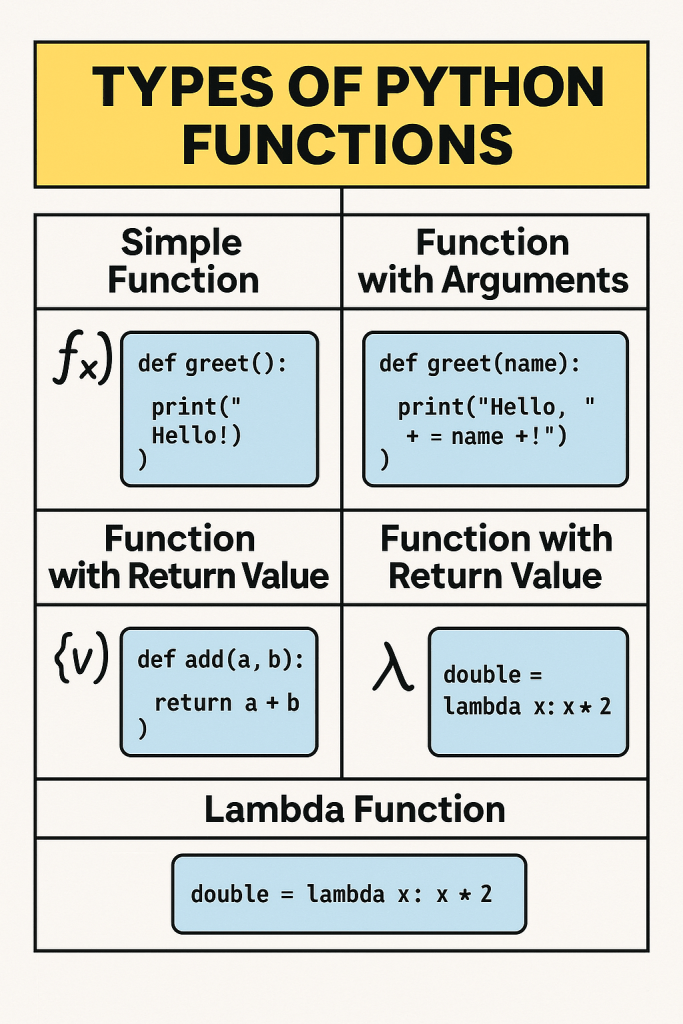
Python functions are the backbone of modular, reusable code. Whether you’re a beginner just learning the ropes or an experienced developer looking to deepen your understanding, mastering Python’s function types and capabilities will significantly enhance your programming skills.
This comprehensive guide walks through all levels of Python functions, from the most basic to advanced concepts. Each section includes detailed explanations, practical examples, use cases, and properly formatted docstrings to help you understand not just the syntax, but when and why to use each function type.
Table of Contents
- Level 1: Basic Functions
- Level 2: Functions with Parameters
- Level 3: Return Values
- Level 4: Default Parameters
- Level 5: Docstrings
- Level 6: Variable Scope
- Level 7: Recursion
- Level 8: Lambda Functions
- Level 9: Function Decorators
- Level 10: Advanced Functions
- Beyond the Basics: Additional Function Concepts
- Best Practices for Python Functions

Level 1: Basic Functions
At their simplest, functions are named blocks of code that perform a specific task. They help organize code, improve readability, and enable reusability.
Syntax and Structure
def my_function():
    print("Hello, world!")
Explanation
- The
defkeyword indicates the beginning of a function definition my_functionis the function name- Parentheses
()contain any parameters (none in this example) - The colon
:marks the end of the function header - Indented code forms the function body
- The function must be called to execute its code

Use Cases
- Code Organization: Breaking a program into smaller, manageable functions
- Reducing Repetition: Write once, use multiple times
- Abstraction: Hide complex implementation details behind simple interfaces
Example with Docstring
def display_welcome_message():
    """
    Display a welcome message to the user.

    This function prints a simple welcome message to the console
    when the application starts.

    Returns:
        None
    """
    print("Welcome to our Python application!")
    print("We're glad you're here!")

# Calling the function
display_welcome_message()
Result:
Welcome to our Python application!
We're glad you're here!
Level 2: Functions with Parameters
Parameters allow functions to receive input data, making them more flexible and reusable.
Syntax and Structure
def greet(name):
    print(f"Hello, {name}!")
Explanation

- Parameters are defined in the parentheses of the function definition
- They act as variables that receive values when the function is called
- Arguments are the actual values passed to the function when called
Use Cases
- Customized Output: Create functions that produce different results based on input
- Data Processing: Transform input data through function operations
- Flexible Behavior: Control function behavior through parameters
Example with Docstring
def greet(name):
    """
    Greet a person by name.

    This function takes a person's name as input and prints
    a personalized greeting message.

    Args:
        name (str): The name of the person to greet

    Returns:
        None
    """
    print(f"Hello, {name}!")
    print(f"Welcome to Python programming, {name}!")

# Calling the function with different arguments
greet("Alice")
greet("Bob")
Result:
Hello, Alice!
Welcome to Python programming, Alice!
Hello, Bob!
Welcome to Python programming, Bob!
Level 3: Return Values
Functions can send data back to the caller using the return statement, enabling them to produce output that can be used elsewhere in your code.
Syntax and Structure
def add(a, b):
    return a + b
Explanation

- The
returnkeyword specifies the value to send back to the caller - Functions can return any Python data type (numbers, strings, lists, dictionaries, etc.)
- A function stops executing when it reaches a
returnstatement - Functions without an explicit
returnstatement returnNoneby default
Use Cases
- Calculations: Perform computations and return the results
- Data Transformation: Convert input data into a new format or structure
- Information Retrieval: Get specific information from complex data structures
Example with Docstring
def add(a, b):
    """
    Add two numbers and return the result.

    This function takes two numeric inputs, adds them together,
    and returns their sum.

    Args:
        a (int/float): The first number
        b (int/float): The second number

    Returns:
        int/float: The sum of a and b
    """
    result = a + b
    return result

# Using the returned value
sum_result = add(3, 5)
print(f"3 + 5 = {sum_result}")

# Using the returned value in another calculation
doubled = add(3, 5) * 2
print(f"Doubled result: {doubled}")
Result:
3 + 5 = 8
Doubled result: 16
Level 4: Default Parameters
Default parameters allow functions to have optional arguments, providing fallback values when an argument isn’t provided.
Syntax and Structure
def greet(name="Guest"):
    print(f"Hello, {name}!")
Explanation
- Default values are specified in the parameter list using the
=operator - If an argument is provided, it overrides the default value
- If no argument is provided, the default value is used
- Parameters with default values must come after parameters without default values
Use Cases
- Optional Configuration: Allow the function to work with minimal input but be customizable
- Simplified API: Make functions easier to use for common cases
- Backward Compatibility: Add new parameters without breaking existing code
Example with Docstring
def create_profile(name, age, location="Unknown", occupation="Not specified"):
    """
    Create a user profile with the given information.

    This function creates and returns a profile dictionary with user information.
    Location and occupation are optional and have default values.

    Args:
        name (str): The user's name
        age (int): The user's age
        location (str, optional): The user's location. Defaults to "Unknown".
        occupation (str, optional): The user's occupation. Defaults to "Not specified".

    Returns:
        dict: A dictionary containing the user's profile information
    """
    profile = {
        "name": name,
        "age": age,
        "location": location,
        "occupation": occupation
    }
    return profile

# Using default values
profile1 = create_profile("Alice", 28)
print(profile1)

# Providing all arguments
profile2 = create_profile("Bob", 35, "New York", "Developer")
print(profile2)

# Mixing default and provided values
profile3 = create_profile("Charlie", 42, occupation="Designer")
print(profile3)
Result:
{'name': 'Alice', 'age': 28, 'location': 'Unknown', 'occupation': 'Not specified'}
{'name': 'Bob', 'age': 35, 'location': 'New York', 'occupation': 'Developer'}
{'name': 'Charlie', 'age': 42, 'location': 'Unknown', 'occupation': 'Designer'}
Level 5: Docstrings
Docstrings document what a function does, how to use it, what parameters it accepts, and what it returns. They make code more maintainable and usable.
Syntax and Structure
def add(a, b):
    """
    This function adds two numbers.
    """
    return a + b
Explanation
- Docstrings are string literals placed at the beginning of a function
- They are enclosed in triple quotes (
"""or''') - They should describe the function’s purpose, parameters, return values, and any exceptions raised
- They can be accessed using the
__doc__attribute or thehelp()function
Use Cases
- Code Documentation: Explain what functions do without needing to read implementation
- API Documentation: Generate reference documentation automatically
- Interactive Help: Provide guidance within interactive Python sessions
Example with Full Docstring
def calculate_area(length, width=None, shape="rectangle"):
    """
    Calculate the area of a geometric shape.

    This function calculates the area of different geometric shapes based on
    the provided dimensions and shape type.

    Args:
        length (float): The length or radius of the shape
        width (float, optional): The width of the shape (required for rectangles).
                                Defaults to None.
        shape (str, optional): The type of shape ('rectangle', 'circle', 'square').
                              Defaults to "rectangle".

    Returns:
        float: The calculated area of the shape

    Raises:
        ValueError: If an invalid shape is specified
        ValueError: If width is not provided for a rectangle

    Examples:
        >>> calculate_area(5, 4)
        20.0
        >>> calculate_area(5, shape="circle")
        78.53981633974483
        >>> calculate_area(5, shape="square")
        25.0
    """
    import math

    if shape == "rectangle":
        if width is None:
            raise ValueError("Width must be provided for rectangles")
        return length * width
    elif shape == "circle":
        return math.pi * length ** 2
    elif shape == "square":
        return length ** 2
    else:
        raise ValueError(f"Unknown shape: {shape}")

# Accessing the docstring
print(calculate_area.__doc__)

# Using the function with different parameters
try:
    rectangle_area = calculate_area(5, 4)
    circle_area = calculate_area(5, shape="circle")
    square_area = calculate_area(5, shape="square")

    print(f"Rectangle area: {rectangle_area}")
    print(f"Circle area: {circle_area}")
    print(f"Square area: {square_area}")

    # This will raise an error
    calculate_area(5, shape="rectangle")
except ValueError as e:
    print(f"Error: {e}")
Result:
Rectangle area: 20.0
Circle area: 78.53981633974483
Square area: 25.0
Error: Width must be provided for rectangles
Level 6: Variable Scope
Variable scope refers to the region of code where a variable is accessible. Understanding scope is crucial for writing correct and predictable functions.
Explanation
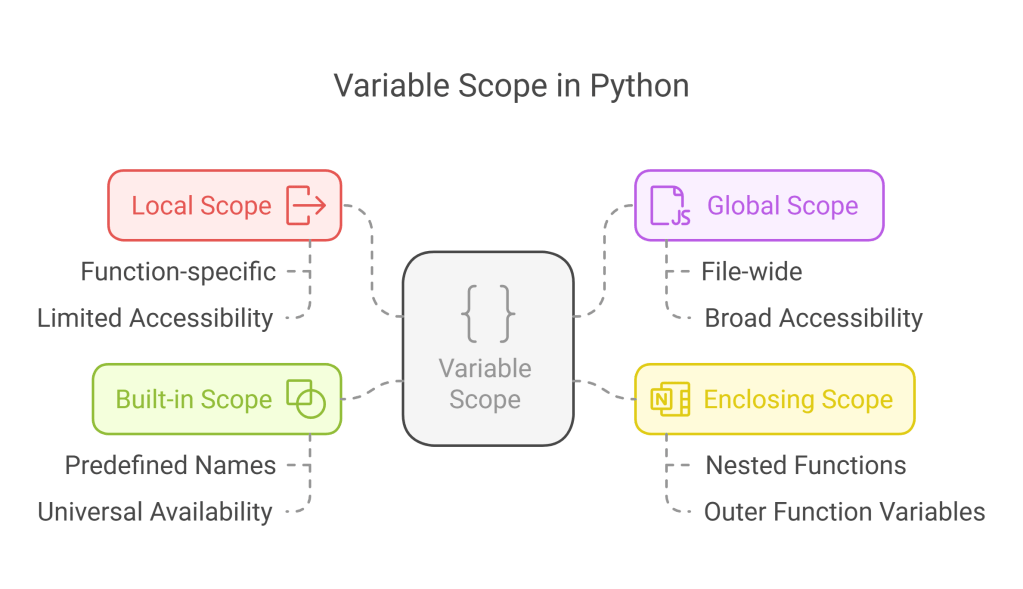
- Local scope: Variables defined inside a function are only accessible within that function
- Global scope: Variables defined outside any function are accessible throughout the file
- Enclosing scope: Variables in outer functions are accessible to nested functions
- Built-in scope: Python’s built-in names (like
print,len, etc.)
Use Cases
- Data Encapsulation: Keep function variables isolated from the rest of the program
- Resource Management: Control access to important variables
- Avoiding Name Conflicts: Prevent variables in different functions from affecting each other
Example with Docstring
global_var = 10

def scope_demonstration():
    """
    Demonstrate variable scope in Python.

    This function showcases local and global variables,
    and demonstrates how to modify global variables from within functions.

    Returns:
        None
    """
    # Local variable
    local_var = 5
    print(f"Inside function - local_var: {local_var}")
    print(f"Inside function - global_var: {global_var}")

def modify_global():
    """
    Demonstrate modifying a global variable from within a function.

    This function shows how to properly modify a global variable
    using the 'global' keyword.

    Returns:
        None
    """
    global global_var
    global_var = 20
    print(f"Inside modify_global - global_var: {global_var}")

# Test the functions
scope_demonstration()
print(f"After scope_demonstration - global_var: {global_var}")

modify_global()
print(f"After modify_global - global_var: {global_var}")

# This would cause an error - local_var is not defined in this scope
try:
    print(local_var)
except NameError as e:
    print(f"Error: {e}")
Result:
Inside function - local_var: 5
Inside function - global_var: 10
After scope_demonstration - global_var: 10
Inside modify_global - global_var: 20
After modify_global - global_var: 20
Error: name 'local_var' is not defined
Level 7: Recursion
Recursion is when a function calls itself. It’s a powerful technique for solving problems that can be broken down into similar subproblems.
Explanation

- A recursive function calls itself with a simpler version of the problem
- It needs a base case to prevent infinite recursion
- The base case is a condition where the function returns a value without making further recursive calls
- Each recursive call should bring the problem closer to the base case
Use Cases
- Tree-like Data Structures: Traversing hierarchical data (file systems, HTML DOM, etc.)
- Mathematical Algorithms: Factorial, Fibonacci sequence, etc.
- Divide and Conquer Algorithms: Merge sort, quicksort, binary search, etc.
Example with Docstring
def factorial(n):
    """
    Calculate the factorial of a non-negative integer using recursion.

    The factorial of n (denoted as n!) is the product of all positive
    integers less than or equal to n. For example, 5! = 5 × 4 × 3 × 2 × 1 = 120.

    Args:
        n (int): A non-negative integer

    Returns:
        int: The factorial of n

    Raises:
        ValueError: If n is negative

    Examples:
        >>> factorial(5)
        120
        >>> factorial(0)
        1
    """
    # Error checking
    if not isinstance(n, int):
        raise TypeError("Input must be an integer")
    if n < 0:
        raise ValueError("Input must be non-negative")

    # Base case
    if n == 0:
        return 1

    # Recursive case
    return n * factorial(n - 1)

# Testing the factorial function
try:
    for i in range(6):
        print(f"{i}! = {factorial(i)}")

    # Demonstrate what happens with a large input
    print(f"20! = {factorial(20)}")

    # This would cause a RecursionError for very large inputs
    # print(factorial(1000))

except (ValueError, TypeError) as e:
    print(f"Error: {e}")
Result:
0! = 1
1! = 1
2! = 2
3! = 6
4! = 24
5! = 120
20! = 2432902008176640000
Level 8: Lambda Functions
Lambda functions (also called anonymous functions) are small, single-expression functions that don’t need a formal definition with def.
Syntax and Structure
double = lambda x: x * 2
Explanation

- The
lambdakeyword introduces an anonymous function - The parameters come before the colon
: - The expression after the colon is automatically returned
- Lambda functions are limited to a single expression
- They can be assigned to variables or used directly
Use Cases
- Short, Simple Functions: When a full function definition would be overkill
- Functional Programming: Used with
map(),filter(),sorted(), etc. - On-the-fly Functions: Creating functions dynamically
Example with Explanation
"""
Lambda Functions in Python

This example demonstrates various uses of lambda functions (anonymous functions)
for concise, functional programming.

Lambda functions are defined with the syntax: lambda parameters: expression
They are limited to a single expression and cannot contain statements.
"""
# Basic lambda function
square = lambda x: x ** 2
print(f"Square of 5: {square(5)}")

# Multiple parameters
add = lambda x, y: x + y
print(f"3 + 5 = {add(3, 5)}")

# Using lambda with built-in functions
numbers = [5, 2, 8, 1, 9, 3]
sorted_numbers = sorted(numbers)
sorted_by_square = sorted(numbers, key=lambda x: x**2)

print(f"Original list: {numbers}")
print(f"Sorted naturally: {sorted_numbers}")
print(f"Sorted by square value: {sorted_by_square}")

# Using lambda with map() and filter()
doubled = list(map(lambda x: x * 2, numbers))
evens = list(filter(lambda x: x % 2 == 0, numbers))

print(f"Doubled values: {doubled}")
print(f"Even numbers: {evens}")

# Lambda with conditional expression
classify = lambda x: "Even" if x % 2 == 0 else "Odd"
for num in range(1, 6):
    print(f"{num} is {classify(num)}")
Result:
Square of 5: 25
3 + 5 = 8
Original list: [5, 2, 8, 1, 9, 3]
Sorted naturally: [1, 2, 3, 5, 8, 9]
Sorted by square value: [1, 2, 3, 5, 8, 9]
Doubled values: [10, 4, 16, 2, 18, 6]
Even numbers: [2, 8]
1 is Odd
2 is Even
3 is Odd
4 is Even
5 is Odd
Level 9: Function Decorators
Decorators are a powerful feature that allows you to modify or enhance functions without changing their code. They wrap a function, modifying its behavior.
Syntax and Structure
def my_decorator(func):
    def wrapper():
        print("Something is happening before the function is called.")
        func()
        print("Something is happening after the function is called.")
    return wrapper

@my_decorator
def say_hello():
    print("Hello!")
Explanation

- A decorator is a function that takes another function as an argument
- It extends or modifies the behavior of the function it decorates
- Decorators use the special
@syntax (syntactic sugar) - They are applied at definition time, not call time
- They can be stacked (multiple decorators can be applied to one function)
Use Cases
- Logging: Track function calls and parameters
- Timing: Measure execution time
- Authentication/Authorization: Check permissions before executing a function
- Caching/Memoization: Store results to avoid redundant computations
- Input Validation: Verify function arguments before execution
Example with Docstring
def timing_decorator(func):
    """
    A decorator that measures and prints the execution time of the decorated function.

    Args:
        func (callable): The function to be decorated

    Returns:
        callable: The wrapped function with timing capability
    """
    import time

    def wrapper(*args, **kwargs):
        """
        Wrapper function that adds timing functionality.

        This inner function calls the original function and measures
        how long it takes to execute.

        Args:
            *args: Variable length argument list for the original function
            **kwargs: Arbitrary keyword arguments for the original function

        Returns:
            The return value from the original function
        """
        start_time = time.time()
        result = func(*args, **kwargs)
        end_time = time.time()

        print(f"Function {func.__name__} took {end_time - start_time:.6f} seconds to run")
        return result

    return wrapper

@timing_decorator
def slow_function(delay):
    """
    A deliberately slow function to demonstrate the timing decorator.

    Args:
        delay (float): Time in seconds to pause execution

    Returns:
        str: A completion message
    """
    import time
    time.sleep(delay)
    return "Function completed"

# Test the decorated function
print(slow_function(1.5))
print(slow_function(0.5))
Result:
Function slow_function took 1.500123 seconds to run
Function completed
Function slow_function took 0.500041 seconds to run
Function completed
Level 10: Advanced Functions
Advanced function concepts include higher-order functions, closures, and function factories – techniques that take full advantage of Python’s functional programming capabilities.
Explanation
- Higher-order functions: Functions that take other functions as arguments or return functions
- Closures: Functions that remember values from their enclosing scope
- Function factories: Functions that create and return other functions
Use Cases
- Custom Control Flow: Creating specialized iteration or processing patterns
- Configuration: Generating customized functions based on parameters
- Domain-Specific Languages: Building expressive APIs for specialized tasks
- State Encapsulation: Creating functions that maintain their own state
Example with Docstring
def create_multiplier(factor):
    """
    Function factory that creates and returns a customized multiplier function.

    This is an example of a closure - the returned function "remembers" the
    factor value even after the outer function has completed.

    Args:
        factor (int/float): The multiplication factor for the created function

    Returns:
        callable: A function that multiplies its input by the given factor
    """
    # Define the inner function that forms a closure over 'factor'
    def multiplier(x):
        """
        Multiply the input by the stored factor.

        Args:
            x (int/float): The value to multiply

        Returns:
            int/float: The product of x and the stored factor
        """
        return x * factor

    # Return the inner function
    return multiplier

def apply(func, value_list):
    """
    Apply a function to each element in a list.

    This is a higher-order function that takes another function as an argument.
    Similar to built-in map() but returns a list directly.

    Args:
        func (callable): The function to apply to each element
        value_list (list): List of values to process

    Returns:
        list: A new list with the function applied to each element
    """
    return [func(value) for value in value_list]

# Create specialized multiplier functions
double = create_multiplier(2)
triple = create_multiplier(3)
half = create_multiplier(0.5)

# Test the generated functions
numbers = [1, 2, 3, 4, 5]
print(f"Original numbers: {numbers}")
print(f"Doubled: {apply(double, numbers)}")
print(f"Tripled: {apply(triple, numbers)}")
print(f"Halved: {apply(half, numbers)}")

# Demonstrate a function that applies multiple operations in sequence
def pipeline(*funcs):
    """
    Create a pipeline of functions to be applied in sequence.

    Each function in the pipeline takes the output of the previous function as input.
    This is an advanced higher-order function that combines multiple functions.

    Args:
        *funcs: Variable number of functions to apply in sequence

    Returns:
        callable: A function that applies all the given functions in sequence
    """
    def apply_all(x):
        result = x
        for func in funcs:
            result = func(result)
        return result
    return apply_all

# Create some simple transformation functions
def square(x):
    return x ** 2

def add_one(x):
    return x + 1

def stringify(x):
    return f"The value is {x}"

# Create a pipeline of operations
transform = pipeline(add_one, square, stringify)

# Apply the pipeline to a value
print(transform(5))  # Should be "The value is 36" (5+1=6, 6²=36)
Result:
Original numbers: [1, 2, 3, 4, 5]
Doubled: [2, 4, 6, 8, 10]
Tripled: [3, 6, 9, 12, 15]
Halved: [0.5, 1.0, 1.5, 2.0, 2.5]
The value is 36
Beyond the Basics: Additional Function Concepts
Function Annotations
Function annotations provide a way to associate metadata with function parameters and return values.
def greet(name: str) -> str:
    """Greet a person by name."""
    return f"Hello, {name}!"
Type Hints
Type hints extend annotations to indicate expected types, enhancing code readability and enabling static type checking.
from typing import List, Dict, Optional

def process_data(items: List[int], config: Optional[Dict[str, str]] = None) -> List[int]:
    """Process a list of integers based on optional configuration."""
    if config is None:
        config = {}
    # Processing logic
    return [item * 2 for item in items]
Generators
Generators are functions that use yield to return a sequence of values one at a time, preserving state between calls.
def fibonacci(n: int):
    """Generate the first n Fibonacci numbers."""
    a, b = 0, 1
    count = 0
    while count < n:
        yield a
        a, b = b, a + b
        count += 1
Coroutines
Coroutines are more advanced generators that can both yield values and receive values through the yield expression.
def averager():
    """A coroutine that calculates a running average."""
    total = 0
    count = 0
    average = None
    while True:
        value = yield average
        total += value
        count += 1
        average = total / count
Asynchronous Functions
Async functions use async/await syntax to enable asynchronous programming, allowing concurrent execution without blocking.
import asyncio

async def fetch_data(url: str) -> str:
    """Asynchronously fetch data from a URL."""
    # Placeholder for actual async HTTP request
    await asyncio.sleep(1)  # Simulate network delay
    return f"Data from {url}"
Best Practices for Python Functions
To write clear, maintainable, and efficient functions, follow these best practices:

- Single Responsibility: Each function should do one thing well
- Descriptive Names: Use verb phrases that clearly describe what the function does
- Proper Documentation: Include docstrings explaining purpose, parameters, and return values
- Limited Parameters: Keep the number of parameters manageable (ideally 4 or fewer)
- Return Early: Use early returns to handle edge cases and simplify flow
- Avoid Side Effects: Functions should not unexpectedly modify variables outside their scope
- Error Handling: Use exceptions appropriately to handle error conditions
- Testing: Write unit tests to verify function behavior
- Type Hints: Use type annotations to clarify expectations
- Consistent Style: Follow Python’s style conventions (PEP 8)
By following these guidelines and mastering the different types of functions described in this article, you’ll be well-equipped to write elegant, efficient, and robust Python code for any application.
Conclusion
From basic functions to advanced concepts like decorators and closures, Python’s function capabilities offer incredible flexibility and power. By understanding when and how to use each type of function, you can write more maintainable, reusable, and efficient code.
Remember that mastering functions is not just about syntax—it’s about learning to structure your code in ways that make it easier to understand, test, and maintain. The journey from basic to advanced functions is a journey toward becoming a more thoughtful and effective Python programmer.
Continue experimenting with these concepts in your own code, and you’ll discover even more ways that Python’s rich function features can help you solve problems elegantly and efficiently.
Discover more from SkillWisor
Subscribe to get the latest posts sent to your email.
 SkillWisor