
Data quality issues plague every data science project. Whether you’re dealing with customer records, sensor data, or web scraping results, you’ll encounter duplicates, missing values, and invalid entries that can derail your analysis. Instead of writing ad-hoc cleaning code for each dataset, building a systematic pipeline approach saves time and ensures consistency across all your projects.

Understanding the Pipeline Architecture
A data processing pipeline works like an assembly line where each station performs a specific function. Raw, messy data enters at one end and emerges as clean, validated information ready for analysis. This systematic approach makes your code more maintainable, testable, and reusable.
The pipeline follows this flow:
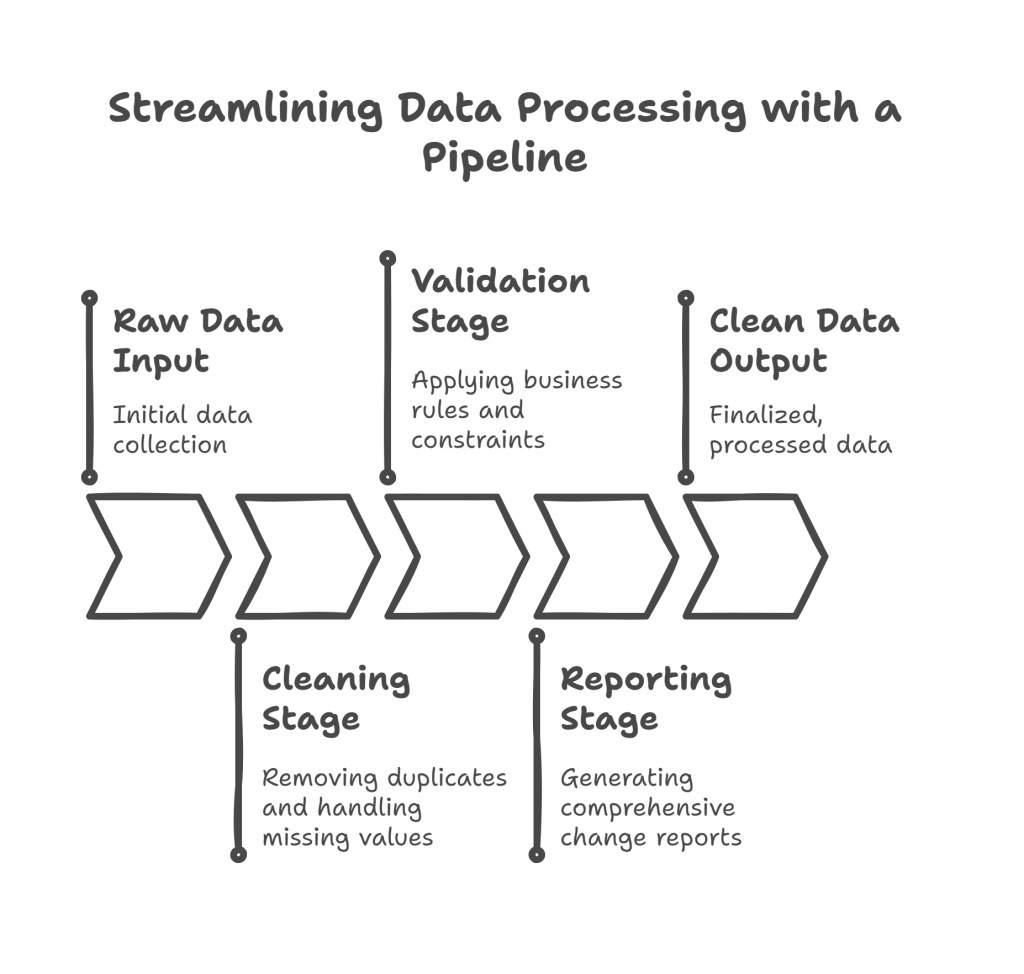
- Raw Data Input → Cleaning Stage → Validation Stage → Reporting Stage → Clean Data Output
- Each stage can apply multiple operations (Remove Duplicates, Handle Missing Values, Business Rules, Constraints)
- A comprehensive Change Report tracks all transformations
Setting Up the Environment
Before we start building, let’s import the necessary libraries and understand what each one provides:
import pandas as pd
import numpy as np
from pydantic import BaseModel, field_validator, ValidationError
from typing import Optional, Dict, Any, List
import logging
from datetime import datetime
Library Breakdown:
- pandas: Handles dataframe operations and data manipulation
- numpy: Provides numerical operations and data type handling
- pydantic: Enables data validation using Python type hints
- typing: Provides type annotations for better code clarity
- logging: Tracks pipeline operations for debugging and monitoring
Step 1: Creating the Data Validation Schema
The first step is defining what “clean data” looks like. We’ll use Pydantic to create a schema that acts as a contract for our data:
class CustomerDataSchema(BaseModel):
    name: str
    age: Optional[int] = None
    email: Optional[str] = None
    salary: Optional[float] = None

    @field_validator('name')
    @classmethod
    def validate_name(cls, value):
        if not value or len(value.strip()) < 2:
            raise ValueError('Name must be at least 2 characters long')
        return value.strip().title()

    @field_validator('age')
    @classmethod
    def validate_age(cls, value):
        if value is not None:
            if not isinstance(value, int) or value < 0 or value > 120:
                raise ValueError('Age must be between 0 and 120')
        return value

    @field_validator('email')
    @classmethod
    def validate_email(cls, value):
        if value is not None:
            value = value.strip().lower()
            if '@' not in value or '.' not in value.split('@')[1]:
                raise ValueError('Invalid email format')
        return value

    @field_validator('salary')
    @classmethod
    def validate_salary(cls, value):
        if value is not None and (value < 0 or value > 1000000):
            raise ValueError('Salary must be between 0 and 1,000,000')
        return value
Schema Explanation:
- BaseModel: Pydantic’s base class that enables automatic validation
- Optional types: Fields that can be None (missing values are allowed)
- @field_validator: Custom validation logic for each field
- @classmethod: Required decorator for Pydantic field validators
- Data cleaning: The name validator automatically strips whitespace and applies title case
- Business rules: Age must be realistic, email must have proper format, salary has reasonable bounds
Step 2: Building the Pipeline Foundation
Now let’s create the core pipeline class that will orchestrate our cleaning operations:
class DataCleaningPipeline:
    def __init__(self):
        self.processing_stats = {
            'original_records': 0,
            'duplicates_removed': 0,
            'missing_values_handled': 0,
            'validation_errors': 0,
            'final_clean_records': 0
        }
        self.operations_log = []
        self.start_time = None

    def _log_operation(self, message: str):
        """Internal method to track all operations performed"""
        timestamp = datetime.now().strftime("%H:%M:%S")
        log_entry = f"[{timestamp}] {message}"
        self.operations_log.append(log_entry)
        print(log_entry)  # Real-time feedback
Foundation Breakdown:
- processing_stats: Dictionary tracking quantitative metrics about data transformations
- operations_log: List storing detailed descriptions of each operation performed
- start_time: Will track processing duration for performance monitoring
- _log_operation: Private method (indicated by underscore) for consistent logging format
- Real-time feedback: Prints operations as they happen for immediate visibility
Step 3: Implementing Duplicate Removal
Duplicates can skew analysis results and waste computational resources. Here’s how we identify and remove them:
def remove_duplicates(self, df: pd.DataFrame) -> pd.DataFrame:
    """
    Remove duplicate rows from the dataframe
    Returns cleaned dataframe and updates statistics
    """
    initial_count = len(df)
    self._log_operation(f"Starting duplicate removal. Initial records: {initial_count}")

    # Keep first occurrence of duplicates
    cleaned_df = df.drop_duplicates(keep='first')

    # Calculate and log statistics
    duplicates_found = initial_count - len(cleaned_df)
    self.processing_stats['duplicates_removed'] = duplicates_found

    if duplicates_found > 0:
        self._log_operation(f"Removed {duplicates_found} duplicate records")

        # Show which columns had the most duplicates
        duplicate_analysis = df[df.duplicated(keep=False)].groupby(list(df.columns)).size()
        if not duplicate_analysis.empty:
            most_common = duplicate_analysis.idxmax()
            self._log_operation(f"Most common duplicate pattern: {most_common}")
    else:
        self._log_operation("No duplicates found")

    return cleaned_df
Duplicate Removal Logic:
- keep=’first’: Retains the first occurrence when duplicates are found
- duplicated(keep=False): Identifies all duplicate rows (including the first occurrence)
- Duplicate analysis: Groups identical rows to show the most common duplicate patterns
- Statistical tracking: Records how many duplicates were removed for reporting
- Conditional logging: Only provides detailed analysis if duplicates exist
Step 4: Handling Missing Values Intelligently
Missing data requires different strategies based on the data type and business context:
def handle_missing_values(self, df: pd.DataFrame) -> pd.DataFrame:
    """
    Handle missing values using appropriate strategies for each data type
    """
    self._log_operation("Starting missing value imputation")
    df_cleaned = df.copy()
    total_missing_handled = 0

    # Handle numeric columns
    numeric_columns = df_cleaned.select_dtypes(include=[np.number]).columns.tolist()
    for column in numeric_columns:
        missing_count = df_cleaned[column].isnull().sum()
        if missing_count > 0:
            if column == 'age':
                # Use median for age (more robust than mean)
                fill_value = df_cleaned[column].median()
                strategy = "median"
            elif column == 'salary':
                # Use mean for salary (assuming normal distribution)
                fill_value = df_cleaned[column].mean()
                strategy = "mean"
            else:
                # Default to median for other numeric columns
                fill_value = df_cleaned[column].median()
                strategy = "median"

            df_cleaned[column].fillna(fill_value, inplace=True)
            total_missing_handled += missing_count
            self._log_operation(f"Filled {missing_count} missing values in '{column}' using {strategy}: {fill_value:.2f}")

    # Handle categorical/string columns
    categorical_columns = df_cleaned.select_dtypes(include=['object']).columns.tolist()
    for column in categorical_columns:
        missing_count = df_cleaned[column].isnull().sum()
        if missing_count > 0:
            if column == 'name':
                fill_value = 'Unknown Person'
            elif column == 'email':
                fill_value = 'no-email@example.com'
            else:
                # Use mode (most frequent value) for other categorical columns
                mode_value = df_cleaned[column].mode()
                fill_value = mode_value[0] if not mode_value.empty else 'Unknown'

            df_cleaned[column].fillna(fill_value, inplace=True)
            total_missing_handled += missing_count
            self._log_operation(f"Filled {missing_count} missing values in '{column}' with: '{fill_value}'")

    self.processing_stats['missing_values_handled'] = total_missing_handled
    self._log_operation(f"Total missing values handled: {total_missing_handled}")

    return df_cleaned
Missing Value Strategy Breakdown:
- Data type detection: Automatically identifies numeric vs categorical columns
- Column-specific logic: Different imputation strategies based on column meaning
- Numeric strategies:
- Median for age: Less affected by outliers than mean
- Mean for salary: Assumes salary follows normal distribution
- Categorical strategies:
- Meaningful defaults: ‘Unknown Person’ is more descriptive than ‘Unknown’
- Mode fallback: Uses most frequent value when appropriate
- Comprehensive tracking: Logs both the strategy used and the fill value applied
Step 5: Implementing Data Validation
This step ensures all data meets our business rules and constraints:
def validate_data(self, df: pd.DataFrame) -> tuple[pd.DataFrame, List[Dict]]:
    """
    Validate each row against the schema and collect validation errors
    Returns: (valid_dataframe, list_of_errors)
    """
    self._log_operation("Starting data validation against schema")

    valid_records = []
    validation_errors = []

    for index, row in df.iterrows():
        try:
            # Convert row to dictionary for Pydantic
            row_dict = row.to_dict()

            # Attempt validation
            validated_record = CustomerDataSchema(**row_dict)

            # If successful, add to valid records
            valid_records.append(validated_record.model_dump())

        except ValidationError as error:
            # Collect detailed error information
            error_details = []
            for err in error.errors():
                field = err['loc'][0] if err['loc'] else 'unknown'
                message = err['msg']
                value = err['input'] if 'input' in err else row_dict.get(field, 'N/A')
                error_details.append(f"{field}: {message} (value: {value})")

            validation_errors.append({
                'row_index': index,
                'original_data': row_dict,
                'errors': error_details,
                'error_count': len(error_details)
            })

    # Update statistics
    self.processing_stats['validation_errors'] = len(validation_errors)
    self.processing_stats['final_clean_records'] = len(valid_records)

    # Log validation results
    self._log_operation(f"Validation complete: {len(valid_records)} valid records, {len(validation_errors)} errors")

    if validation_errors:
        # Show error summary
        error_summary = {}
        for error_record in validation_errors:
            for error_detail in error_record['errors']:
                field = error_detail.split(':')[0]
                error_summary[field] = error_summary.get(field, 0) + 1

        self._log_operation("Error summary by field:")
        for field, count in error_summary.items():
            self._log_operation(f"  - {field}: {count} errors")

    return pd.DataFrame(valid_records), validation_errors
Validation Process Breakdown:

- Row-by-row processing: Each record is validated independently to prevent one bad record from stopping the entire process
- Error collection: Instead of failing fast, we collect all validation errors for comprehensive reporting
- Detailed error information: Each error includes the field name, error message, and problematic value
- Error summarization: Groups errors by field to identify the most common validation issues
- Graceful handling: Valid records continue through the pipeline while errors are set aside for review
Step 6: Creating Comprehensive Reports
The reporting system provides transparency into what transformations were applied:
def generate_processing_report(self) -> Dict[str, Any]:
    """
    Generate a comprehensive report of all pipeline operations
    """
    processing_time = (datetime.now() - self.start_time).total_seconds() if self.start_time else 0

    # Calculate data quality score
    original_count = self.processing_stats['original_records']
    final_count = self.processing_stats['final_clean_records']
    quality_score = (final_count / original_count * 100) if original_count > 0 else 0

    # Categorize operations by type
    cleaning_operations = [op for op in self.operations_log if any(keyword in op.lower()
                          for keyword in ['removed', 'filled', 'duplicate'])]
    validation_operations = [op for op in self.operations_log if 'validation' in op.lower()]

    report = {
        'summary': {
            'original_records': original_count,
            'final_clean_records': final_count,
            'data_retention_rate': f"{quality_score:.1f}%",
            'processing_time_seconds': round(processing_time, 2),
            'total_operations': len(self.operations_log)
        },
        'data_quality_metrics': {
            'duplicates_removed': self.processing_stats['duplicates_removed'],
            'missing_values_handled': self.processing_stats['missing_values_handled'],
            'validation_errors': self.processing_stats['validation_errors']
        },
        'operation_categories': {
            'cleaning_operations': len(cleaning_operations),
            'validation_operations': len(validation_operations)
        },
        'detailed_log': self.operations_log,
        'recommendations': self._generate_recommendations()
    }

    return report

def _generate_recommendations(self) -> List[str]:
    """
    Generate actionable recommendations based on processing results
    """
    recommendations = []
    stats = self.processing_stats

    if stats['duplicates_removed'] > stats['original_records'] * 0.1:
        recommendations.append("High duplicate rate detected. Review data collection process.")

    if stats['missing_values_handled'] > stats['original_records'] * 0.2:
        recommendations.append("Significant missing data found. Consider improving data capture.")

    if stats['validation_errors'] > stats['original_records'] * 0.15:
        recommendations.append("Many validation errors. Review data entry procedures.")

    retention_rate = stats['final_clean_records'] / stats['original_records'] if stats['original_records'] > 0 else 0
    if retention_rate < 0.8:
        recommendations.append("Low data retention rate. Consider relaxing validation rules.")

    if not recommendations:
        recommendations.append("Data quality looks good! No specific recommendations.")

    return recommendations
Reporting System Breakdown:
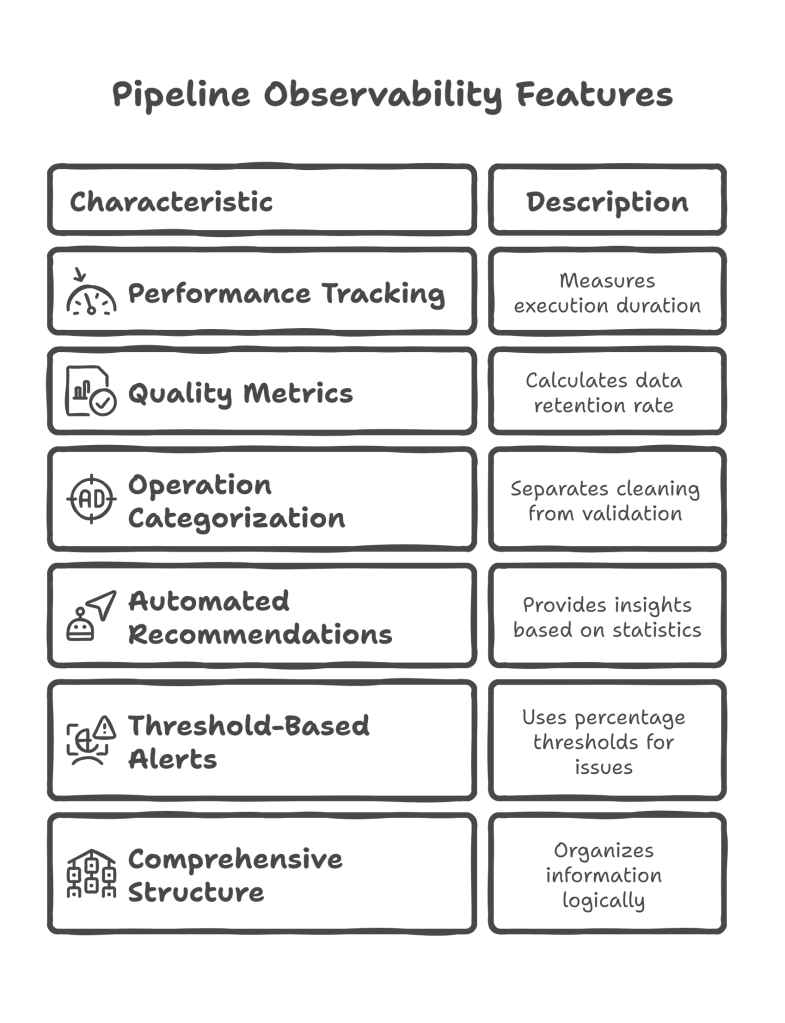
- Performance tracking: Measures how long the pipeline took to execute
- Quality metrics: Calculates data retention rate as a key quality indicator
- Operation categorization: Separates cleaning operations from validation operations
- Automated recommendations: Provides actionable insights based on processing statistics
- Threshold-based alerts: Uses percentage-based thresholds to identify potential issues
- Comprehensive structure: Organizes information in logical sections for easy consumption
Step 7: Orchestrating the Complete Pipeline
Now let’s tie everything together with the main processing method:
def process_data(self, raw_data: pd.DataFrame) -> Dict[str, Any]:
    """
    Execute the complete data cleaning and validation pipeline
    """
    self.start_time = datetime.now()
    self.processing_stats['original_records'] = len(raw_data)

    self._log_operation("="*50)
    self._log_operation("STARTING DATA PROCESSING PIPELINE")
    self._log_operation("="*50)

    try:
        # Step 1: Remove duplicates
        self._log_operation("\n--- STEP 1: DUPLICATE REMOVAL ---")
        cleaned_data = self.remove_duplicates(raw_data)

        # Step 2: Handle missing values
        self._log_operation("\n--- STEP 2: MISSING VALUE IMPUTATION ---")
        cleaned_data = self.handle_missing_values(cleaned_data)

        # Step 3: Validate data
        self._log_operation("\n--- STEP 3: DATA VALIDATION ---")
        validated_data, validation_errors = self.validate_data(cleaned_data)

        # Step 4: Generate report
        self._log_operation("\n--- STEP 4: REPORT GENERATION ---")
        processing_report = self.generate_processing_report()

        self._log_operation("="*50)
        self._log_operation("PIPELINE COMPLETED SUCCESSFULLY")
        self._log_operation("="*50)

        return {
            'success': True,
            'clean_data': validated_data,
            'validation_errors': validation_errors,
            'processing_report': processing_report
        }

    except Exception as error:
        self._log_operation(f"PIPELINE FAILED: {str(error)}")
        return {
            'success': False,
            'error': str(error),
            'partial_results': None
        }
Pipeline Orchestration Breakdown:

- Sequential execution: Each step builds on the previous one’s output
- Error handling: Try-catch block prevents pipeline crashes and provides meaningful error messages
- Visual separation: Clear section headers make it easy to follow pipeline progress
- Comprehensive output: Returns both successful results and error information
- Status tracking: Boolean success flag makes it easy to check if pipeline completed successfully
Step 8: Practical Usage Example
Here’s how to use the complete pipeline with real-world messy data:
# Create sample dataset with various data quality issues
sample_messy_data = pd.DataFrame({
    'name': ['john doe', 'JANE SMITH', 'john doe', None, 'bob johnson', '  alice brown  '],
    'age': [25, -5, 25, 150, 35, 28],
    'email': ['john@email.com', 'invalid-email', 'john@email.com',
              'old@email.com', 'BOB@WORK.COM', 'alice@company.com'],
    'salary': [50000, 65000, 50000, None, 80000, 75000]
})

print("Original Data:")
print(sample_messy_data)
print(f"\nOriginal data shape: {sample_messy_data.shape}")
Sample Data Issues:
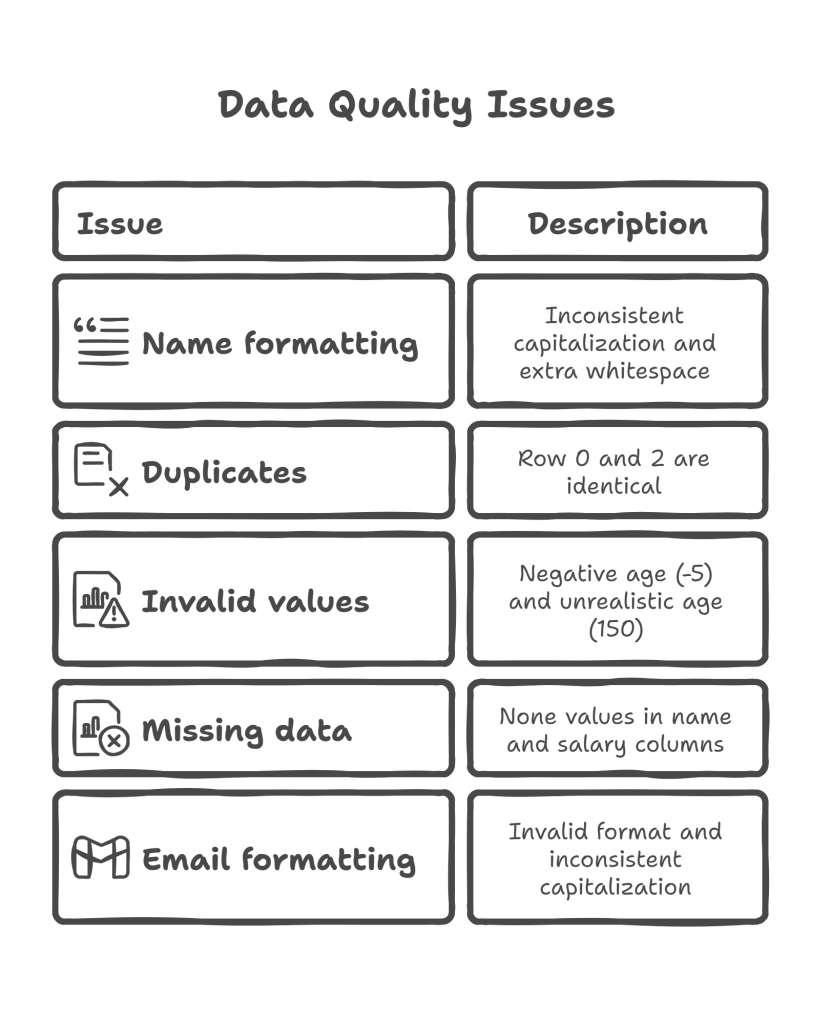
- Name formatting: Inconsistent capitalization and extra whitespace
- Duplicates: Row 0 and 2 are identical
- Invalid values: Negative age (-5) and unrealistic age (150)
- Missing data: None values in name and salary columns
- Email formatting: Invalid format and inconsistent capitalization
# Initialize and run the pipeline
pipeline = DataCleaningPipeline()
results = pipeline.process_data(sample_messy_data)

# Check if processing was successful
if results['success']:
    print("\n" + "="*60)
    print("FINAL RESULTS")
    print("="*60)

    # Display cleaned data
    clean_data = results['clean_data']
    print(f"\nCleaned Data ({len(clean_data)} records):")
    print(clean_data)

    # Show validation errors if any
    validation_errors = results['validation_errors']
    if validation_errors:
        print(f"\nValidation Errors ({len(validation_errors)} records):")
        for i, error in enumerate(validation_errors, 1):
            print(f"\nError {i} (Row {error['row_index']}):")
            print(f"  Original data: {error['original_data']}")
            print(f"  Issues found:")
            for issue in error['errors']:
                print(f"    - {issue}")

    # Display processing summary
    report = results['processing_report']
    print(f"\n" + "="*40)
    print("PROCESSING SUMMARY")
    print("="*40)
    print(f"Original records: {report['summary']['original_records']}")
    print(f"Final clean records: {report['summary']['final_clean_records']}")
    print(f"Data retention rate: {report['summary']['data_retention_rate']}")
    print(f"Processing time: {report['summary']['processing_time_seconds']} seconds")

    print(f"\nData Quality Metrics:")
    metrics = report['data_quality_metrics']
    print(f"  - Duplicates removed: {metrics['duplicates_removed']}")
    print(f"  - Missing values handled: {metrics['missing_values_handled']}")
    print(f"  - Validation errors: {metrics['validation_errors']}")

    print(f"\nRecommendations:")
    for rec in report['recommendations']:
        print(f"  • {rec}")

else:
    print(f"Pipeline failed: {results['error']}")
Usage Example Breakdown:
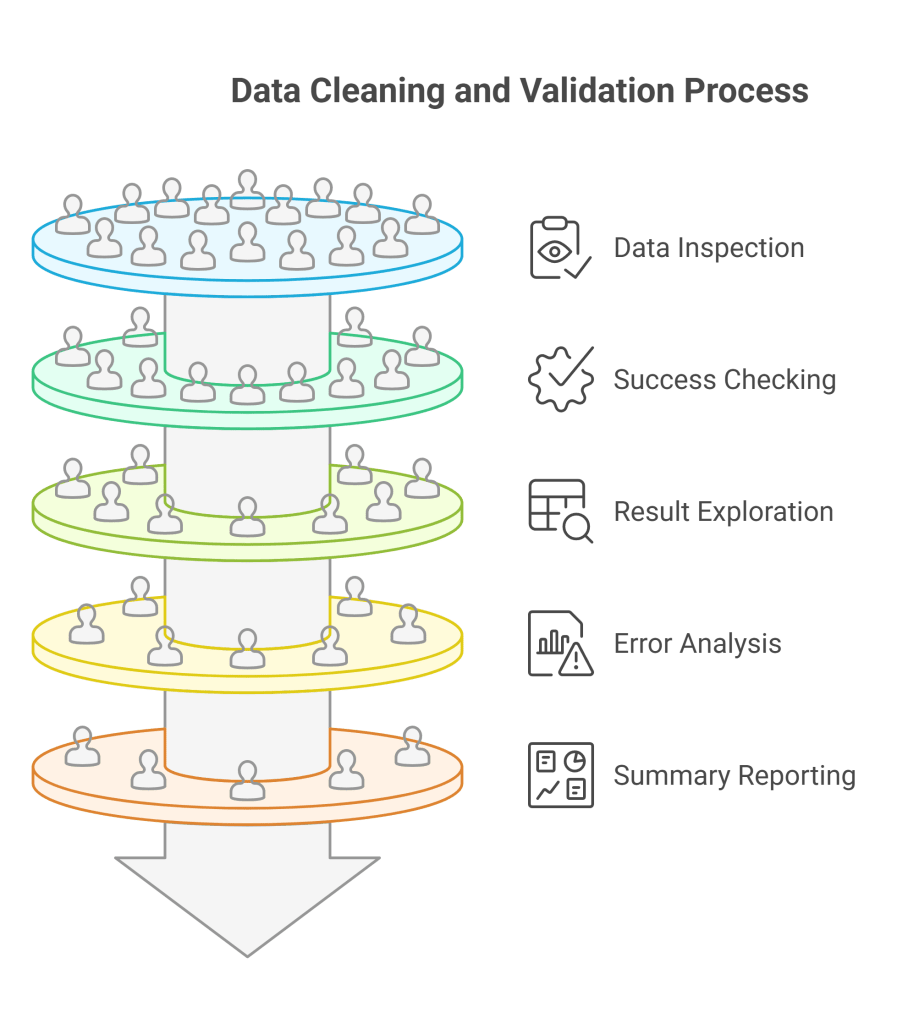
- Data inspection: Always examine the original data first to understand what issues exist
- Success checking: Verify pipeline completed successfully before accessing results
- Result exploration: Systematically examine cleaned data, errors, and processing statistics
- Error analysis: For validation errors, show both original data and specific issues found
- Summary reporting: Present key metrics in an easy-to-read format
- Actionable insights: Display recommendations to improve future data quality
Advanced Pipeline Extensions
Custom Business Rules
You can extend the pipeline with domain-specific validation rules:
def apply_custom_constraints(self, df: pd.DataFrame, business_rules: Dict[str, Any]) -> pd.DataFrame:
    """
    Apply additional business-specific constraints to the data
    """
    self._log_operation("Applying custom business rules")
    constrained_df = df.copy()

    for rule_name, rule_config in business_rules.items():
        if rule_name == 'salary_age_ratio':
            # Rule: Salary should be reasonable for age
            min_salary_per_age = rule_config.get('min_ratio', 1000)
            mask = (constrained_df['salary'] / constrained_df['age']) >= min_salary_per_age
            removed_count = len(constrained_df) - mask.sum()
            constrained_df = constrained_df[mask]
            self._log_operation(f"Removed {removed_count} records violating salary-age ratio rule")

        elif rule_name == 'email_domain_whitelist':
            # Rule: Only allow specific email domains
            allowed_domains = rule_config.get('domains', [])
            if allowed_domains:
                domain_mask = constrained_df['email'].str.split('@').str[1].isin(allowed_domains)
                removed_count = len(constrained_df) - domain_mask.sum()
                constrained_df = constrained_df[domain_mask]
                self._log_operation(f"Removed {removed_count} records with non-whitelisted email domains")

    return constrained_df
Custom Rules Breakdown:
- Flexible configuration: Rules are defined through a dictionary for easy modification
- Business logic: Implements domain-specific validation that goes beyond basic data types
- Statistical constraints: Can validate relationships between multiple fields
- Whitelist/blacklist: Supports domain-specific allowed values
Error Recovery and Data Repair
Sometimes data can be automatically corrected instead of rejected:
def attempt_data_repair(self, validation_errors: List[Dict]) -> pd.DataFrame:
    """
    Attempt to automatically repair common data formatting issues
    """
    self._log_operation("Attempting automatic data repair")
    repaired_records = []

    for error_record in validation_errors:
        original_data = error_record['original_data'].copy()
        repaired = False

        # Fix common email issues
        if 'email' in original_data and original_data['email']:
            email = original_data['email']

            # Missing @ symbol but has dot
            if '@' not in email and '.' in email:
                parts = email.split('.')
                if len(parts) == 2:
                    original_data['email'] = f"{parts[0]}@{parts[1]}"
                    repaired = True
                    self._log_operation(f"Repaired email: {email} → {original_data['email']}")

        # Fix age data entry errors
        if 'age' in original_data and original_data['age']:
            age = original_data['age']

            # Possible birth year instead of age
            if 1900 <= age <= 2020:
                current_year = datetime.now().year
                corrected_age = current_year - age
                if 0 <= corrected_age <= 120:
                    original_data['age'] = corrected_age
                    repaired = True
                    self._log_operation(f"Repaired age: {age} (birth year) → {corrected_age}")

        if repaired:
            repaired_records.append(original_data)

    return pd.DataFrame(repaired_records) if repaired_records else pd.DataFrame()
Data Repair Breakdown:

- Pattern recognition: Identifies common data entry mistakes
- Conservative approach: Only attempts repairs when confident about the correction
- Detailed logging: Tracks what repairs were made for transparency
- Safe fallback: Returns empty DataFrame if no repairs are possible
This comprehensive pipeline provides a solid foundation for handling real-world data quality issues while maintaining transparency and flexibility for customization to your specific needs.
Discover more from SkillWisor
Subscribe to get the latest posts sent to your email.
 SkillWisor