
A SkillWisor Deep Dive
The Problem: Your LLM Bills Are Out of Control
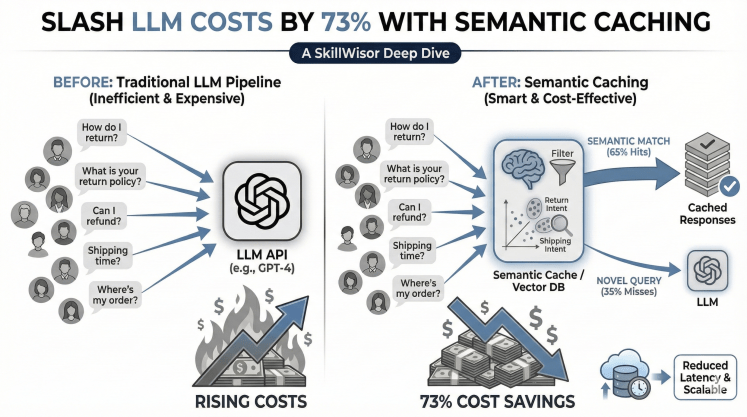
Picture this: You’ve built a customer support chatbot for your e-commerce platform. It’s powered by GPT-4, handles 10,000 customer queries daily, and provides excellent responses. Everything’s great until you check your monthly bill: $3,500 in API costs alone.
Your finance team is asking questions. Your CEO wants answers. But here’s what makes it worse: when you analyze the queries, you discover something shocking:
You’re paying for the same answers over and over again.
- A customer asks “How do I return an item?” → You pay $0.003
- Another asks “What’s your return policy?” → You pay $0.003 again
- Someone else asks “Can I send something back?” → Another $0.003
These are the same question, just worded differently. Yet you’re treating them as three separate queries and paying three times. Multiply this pattern across thousands of daily queries, and you see why costs spiral out of control.
The Solution: Understanding Query Patterns
Recent enterprise data analysis reveals a fascinating pattern in customer queries: The 18% / 47% / 35% Rule.
When analyzing 100,000 actual customer support queries, researchers discovered:
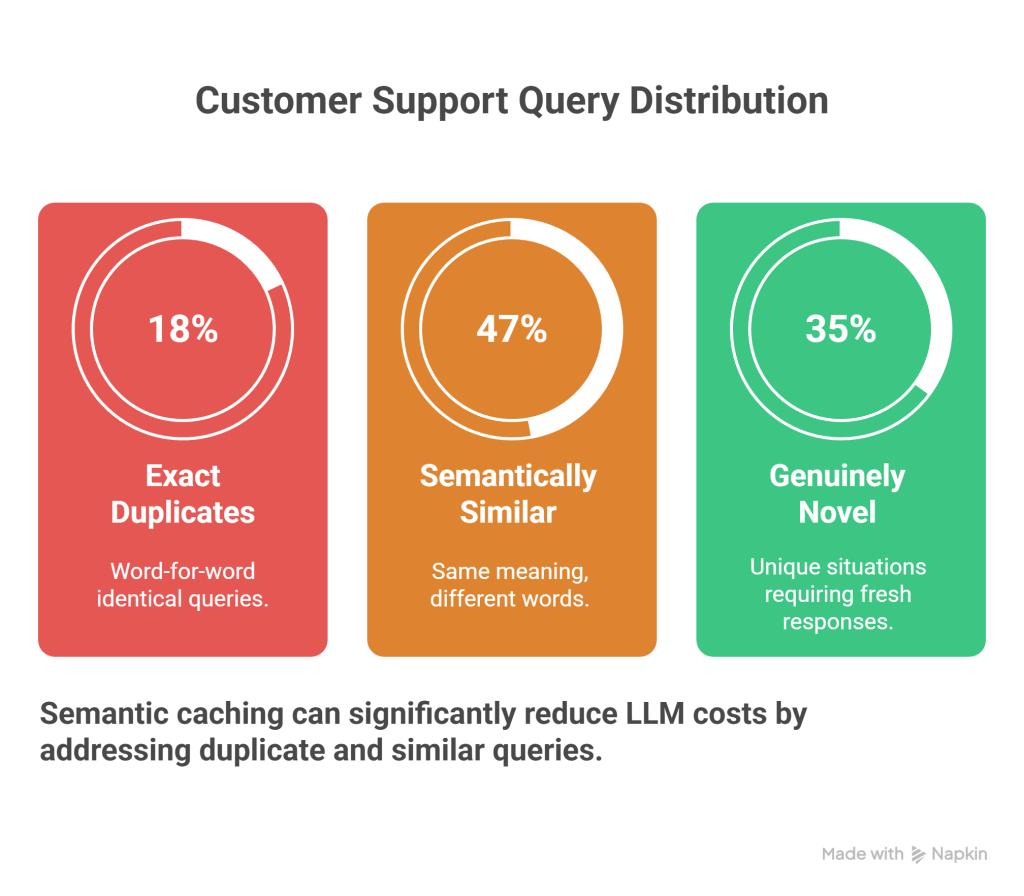
- 18% were exact duplicates – Word-for-word identical queries.
- 47% were semantically similar – Same meaning, different words.
- 35% were genuinely novel – Unique situations requiring fresh responses.
The Opportunity in Practice
1. Exact Duplicates (18%)
- User 1: “What is your refund policy?”
- User 2: “What is your refund policy?”
- Traditional caching (Redis) handles these perfectly.
2. Semantically Similar (47%) – THE GOLDMINE
- “What is your refund policy?”
- “How do I get my money back?”
- “Can you explain your return and refund process?”
- “Do you offer refunds?”
- Traditional caching misses all of these. This is where you bleed money.
3. Novel Queries (35%)
- “My order #12345 hasn’t arrived in 3 weeks”
- “I received a damaged item, the screen is cracked”
- No caching helps here – these require fresh LLM intelligence.
The Critical Insight: Traditional caching only captures 18% of savings. Semantic caching captures 65% (18% + 47%), resulting in massive cost reductions.
What is Semantic Caching?
Traditional Caching (The “Exact Match” Trap)
Traditional caching works like a dictionary lookup—it only matches exact strings.
- Query: “How do I return an item?”
- Key:
how_do_i_return_an_item - Method: Exact string match.
- Result: If a user misses a question mark, it’s a Cache MISS.
Semantic Caching (The “Meaning” Match)
Semantic caching is smarter. It understands meaning. It knows that “refund” and “money back” are asking for the same thing.
- Query 1: “How do I return an item?” $\rightarrow$ Vector
[0.23, -0.45, ...] - Query 2: “What’s your return process?” $\rightarrow$ Vector
[0.21, -0.43, ...] - Similarity: 0.89 (89% match) $\rightarrow$ CACHE HIT!
Understanding Vector Embeddings: The Foundation
Before we dive into code, let’s understand the “magic” behind semantic caching: Vector Embeddings.
Think of describing a person with numbers:
- Person A:
[Height: 5.8, Weight: 160, Age: 30, Hair: 0.7] - Person B:
[Height: 5.9, Weight: 165, Age: 31, Hair: 0.6]
These people are “similar” because their numbers are close. Embeddings work the same way for text.
Visual Representation:
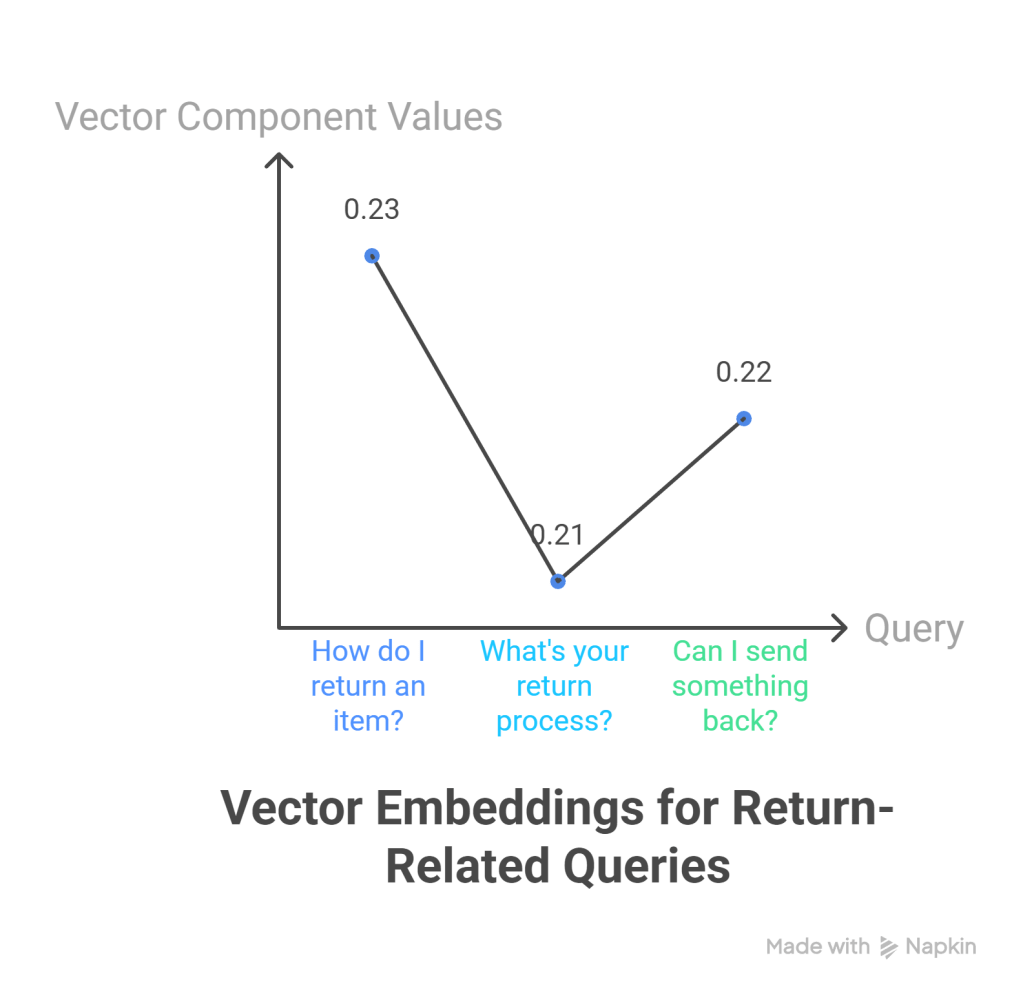
Text Space (what we write):"How do I return an item?" ──────┐"What's your return process?" ───┤──→ All map to nearby points"Can I send something back?" ────┘ in vector spaceVector Space (mathematical representation)[0.23, -0.45, 0.67, 0.12, ...] ← "How do I return an item?"[0.21, -0.43, 0.65, 0.14, ...] ← "What's your return process?"[0.22, -0.44, 0.66, 0.13, ...] ← "Can I send something back?"Notice: The numbers are very close! That’s because the questions have similar meanings.
Measuring Similarity: Cosine Similarity
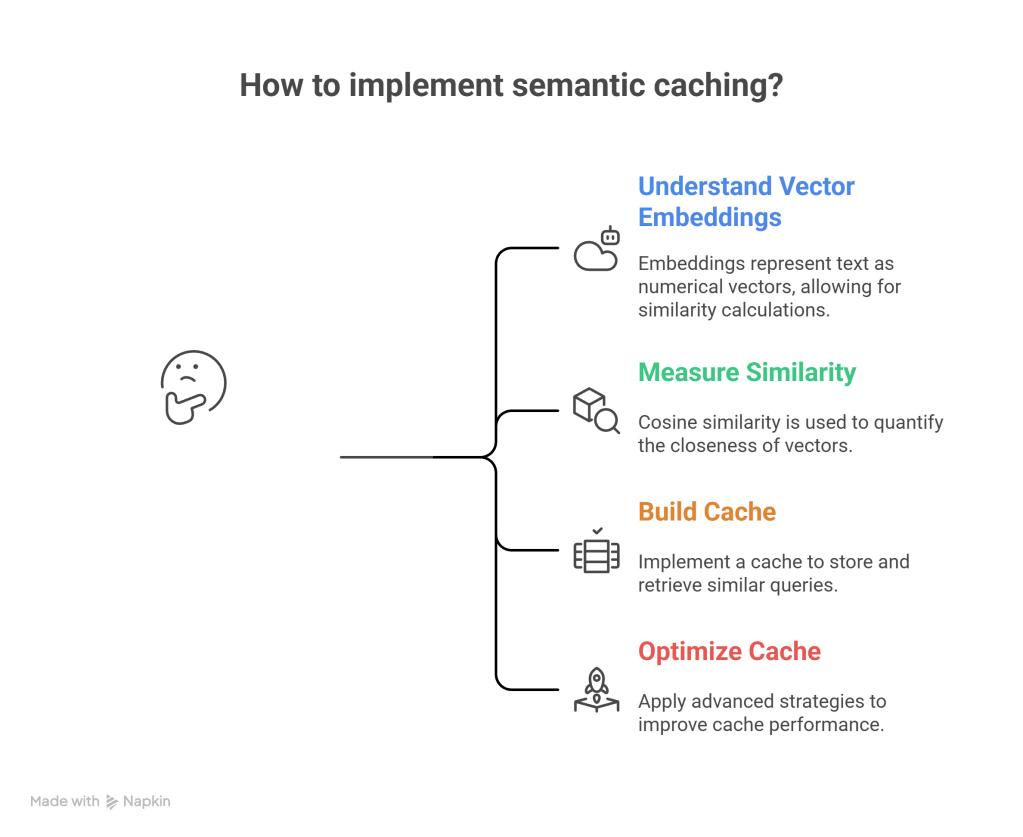
To determine if two questions are semantically similar, we calculate cosine similarity — a measure that ranges from 0 (completely different) to 1 (identical meaning).
- Similarity = 1.0: Identical meaning
- Similarity > 0.85: Very similar (different phrasing)
- Similarity = 0.0: Unrelated
Real Example:
- Query A: “How do I return an item?”
- Query B: “What’s your return process?”
- Cosine Similarity: 0.89 → Cache HIT! ✓
- Query A: “How do I return an item?”
- Query C: “What are your business hours?”
- Cosine Similarity: 0.23 → Cache MISS ✗
Building Your Semantic Cache: Complete Implementation
Let’s build a production-ready semantic caching system step by step.
Prerequisites
pip install numpy sentence-transformers faiss-cpu openaiStep 1: The Core Semantic Cache Class
This class handles the vectorization, storage, and similarity search using FAISS (Facebook AI Similarity Search).
import numpy as npfrom sentence_transformers import SentenceTransformerimport faissfrom typing import Dict, Tuple, Optionalimport timeimport hashlibclass SemanticCache: """ A semantic caching system that retrieves LLM responses based on meaning similarity rather than exact string matches. """ def __init__(self, similarity_threshold: float = 0.85, model_name: str = 'all-MiniLM-L6-v2'): """ Args: similarity_threshold: Minimum similarity (0-1) for cache hit. 0.95+: Nearly identical wording required 0.85-0.90: Same intent, different phrasing (RECOMMENDED) < 0.75: Risk of false positives """ print(f"🚀 Initializing Semantic Cache...") # Load the embedding model (converts text -> vectors) # 'all-MiniLM-L6-v2' is fast and produces 384-dimensional vectors self.encoder = SentenceTransformer(model_name) self.dimension = self.encoder.get_sentence_embedding_dimension() # Initialize FAISS index for lightning-fast similarity search self.index = faiss.IndexFlatIP(self.dimension) # Store actual query-response pairs self.cache_store: Dict[str, Tuple[str, str, float]] = {} self.similarity_threshold = similarity_threshold # Performance tracking self.hits = 0 self.misses = 0 self.exact_matches = 0 self.semantic_matches = 0 def _create_embedding(self, text: str) -> np.ndarray: # Generate embedding and normalize for cosine similarity embedding = self.encoder.encode(text, convert_to_numpy=True) embedding = embedding / np.linalg.norm(embedding) return embedding def _get_embedding_hash(self, embedding: np.ndarray) -> str: # Create a unique identifier for the embedding return hashlib.md5(embedding.tobytes()).hexdigest() def set(self, query: str, response: str) -> None: """Store a query-response pair in cache.""" embedding = self._create_embedding(query) self.index.add(embedding.reshape(1, -1)) embedding_hash = self._get_embedding_hash(embedding) # Store complete info including timestamp self.cache_store[embedding_hash] = (query, response, time.time()) print(f"💾 Cached: '{query[:50]}...'") def get(self, query: str) -> Tuple[Optional[str], Dict[str, any]]: """Retrieve cached response for semantically similar query.""" if self.index.ntotal == 0: self.misses += 1 return None, {'type': 'miss', 'reason': 'empty_cache'} embedding = self._create_embedding(query) # Search FAISS index for the 1 closest vector similarities, indices = self.index.search(embedding.reshape(1, -1), k=1) similarity_score = float(similarities[0][0]) if similarity_score >= self.similarity_threshold: # CACHE HIT! matched_embedding = self.index.reconstruct(int(indices[0][0])) embedding_hash = self._get_embedding_hash(matched_embedding) original_query, cached_response, timestamp = self.cache_store[embedding_hash] is_exact = (query.strip().lower() == original_query.strip().lower()) match_type = "EXACT" if is_exact else "SEMANTIC" if is_exact: self.exact_matches += 1 else: self.semantic_matches += 1 self.hits += 1 return cached_response, { 'type': 'hit', 'match_type': match_type.lower(), 'similarity': similarity_score, 'original_query': original_query } else: self.misses += 1 return None, {'type': 'miss', 'reason': 'below_threshold', 'similarity': similarity_score} def get_stats(self): """Return the 18/47/35 breakdown.""" total = self.hits + self.misses if total == 0: return {} return { 'total': total, 'hit_rate': (self.hits / total) * 100, 'exact_rate': (self.exact_matches / total) * 100, 'semantic_rate': (self.semantic_matches / total) * 100, 'miss_rate': (self.misses / total) * 100 }Step 2: The Bot & Execution Logic
Now we hook this into our chatbot. This wrapper class handles the logic of “Check Cache -> If Miss -> Call LLM”.
import openaiimport osclass CustomerSupportBot: def __init__(self, api_key: str): openai.api_key = api_key # Initialize our cache from Step 1 self.cache = SemanticCache(similarity_threshold=0.85) self.total_api_calls = 0 def answer_query(self, query: str) -> str: # 1. Try Cache cached_response, metadata = self.cache.get(query) if cached_response: match_type = metadata['match_type'].upper() print(f" 🔥 {match_type} MATCH found! (Saved API Call)") return cached_response # 2. Call LLM (Simulated for this demo) print(" 🆕 Novel query - calling LLM API...") self.total_api_calls += 1 # Mock LLM response for demo purposes # In production, this would be: openai.ChatCompletion.create(...) response = f"Here is the helpful answer to: {query}" # 3. Store in Cache self.cache.set(query, response) return responsedef run_demo(): # Initialize bot with a mock key for testing bot = CustomerSupportBot(api_key="mock-key") # Test Queries representing the 18/47/35 distribution queries = [ # Group 1: Returns "How do I return an item?", "What is your return policy?", # Semantic Match (The 47%) # Group 2: Shipping "How long does shipping take?", "When will my order arrive?", # Semantic Match (The 47%) # Group 3: Exact Duplicates "How do I return an item?", # Exact Match (The 18%) # Group 4: Novel Queries "My order #12345 arrived damaged", # Novel (The 35%) "Can I change my shipping address?", # Novel (The 35%) ] print("Processing queries...") for q in queries: print(f"\nQuery: {q}") bot.answer_query(q) time.sleep(0.1) stats = bot.cache.get_stats() print(f"\nFinal Stats: {stats['hit_rate']:.1f}% Hit Rate")if __name__ == "__main__": run_demo()Advanced Optimization Strategies
To make this system truly enterprise-grade, you should consider these advanced strategies:
1. Category-Specific Caching
Different query types may need different similarity thresholds.
- Policy Questions (e.g., Returns): Use a high threshold (0.88). Answers are definitive and risky to get wrong.
- Technical Support: Use a lower threshold (0.82). Users often describe bugs (“screen is broken”, “display cracked”) in varied ways.
- Order Tracking: Use a very high threshold (0.95). Order numbers must be exact.
2. Time-Based Cache Expiration (TTL)
Some answers become stale. Implement a Time-To-Live (TTL) based on content type:
- Policies: 30 days (Change rarely)
- Shipping Info: 7 days (Varies by season)
- Promotions: 24 hours (Change frequently)
3. Production Deployment Checklist
Before deploying semantic caching to production:
- Performance Testing: Ensure vector lookups are faster than LLM calls (usually <10ms vs 2000ms).
- Memory Management: FAISS stores vectors in RAM. Implement an LRU (Least Recently Used) eviction policy to prevent memory leaks if your cache grows indefinitely.
- Monitoring: Track your “False Positive” rate. If users are complaining about irrelevant answers, your threshold (0.85) might be too low.
The Architecture: The “Middleware” Pattern
Technically, semantic caching is implemented as Middleware or an Interception Layer in your backend code.
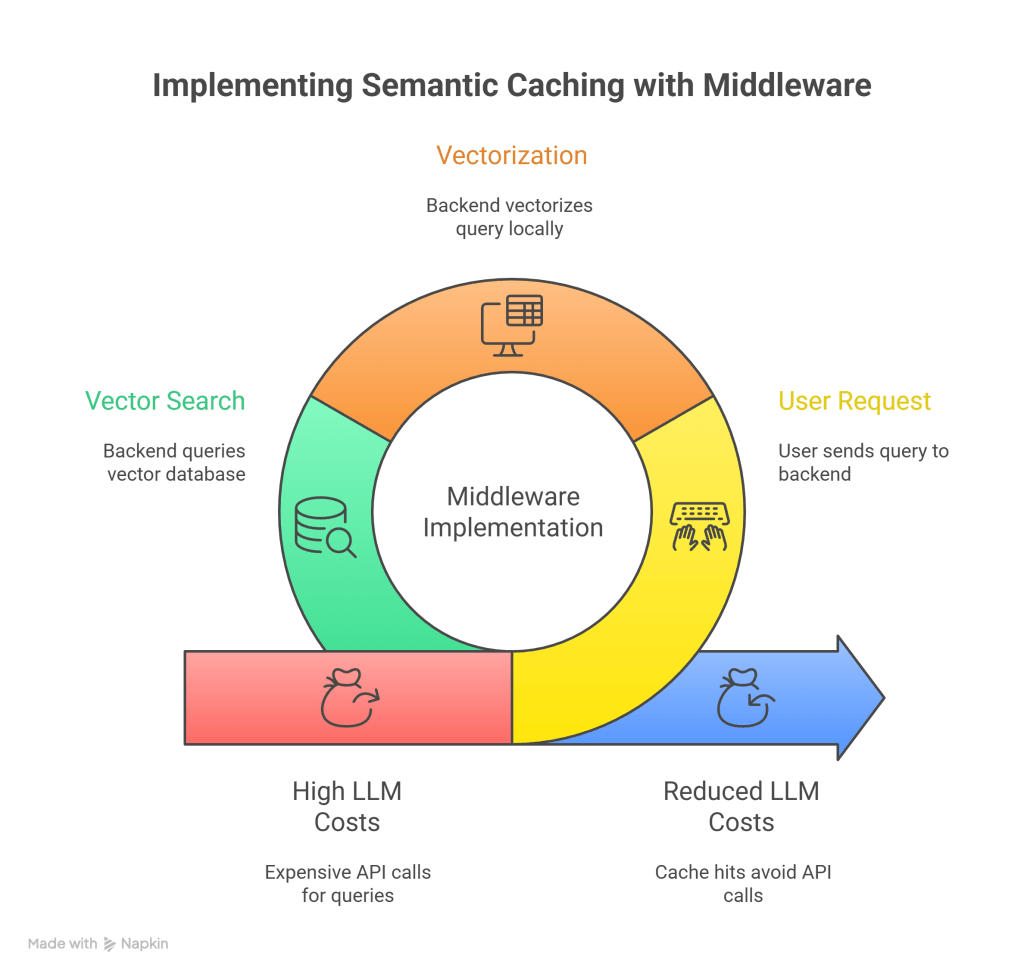
Step 1: User Request (HTTP POST)
The user types “How do I reset my password?” in your frontend app.
- Data: JSON Payload
{ "query": "How do I reset my password?" } - Destination: Your Backend API (e.g., Python/FastAPI, Node.js), NOT OpenAI directly.
Step 2: Vectorization (Local Compute)
Your backend receives the text. Before calling OpenAI, it runs the text through a small, cheap, or local Embedding Model (like all-MiniLM-L6-v2 running on your own CPU/GPU).
- Input: “How do I reset my password?”
- Process: Matrix multiplication in your local RAM.
- Output: Vector
[0.12, -0.45, 0.88, ...] - Cost: Near zero (it uses your server’s electricity, not an API token).
Step 3: The Vector Search (The Gatekeeper)
Your backend takes that vector and queries your Vector Database (FAISS, Redis, Pinecone).
- Operation: It performs an Approximate Nearest Neighbor (ANN) search.
- Question: “Is there any vector in the database that has a Cosine Similarity > 0.85 with this new vector?”
The “Fork” in the Road (Where Money is Saved)
This is the technical detail that determines if tokens are sent or saved.
Scenario A: Cache HIT (The Gate Stays Closed)
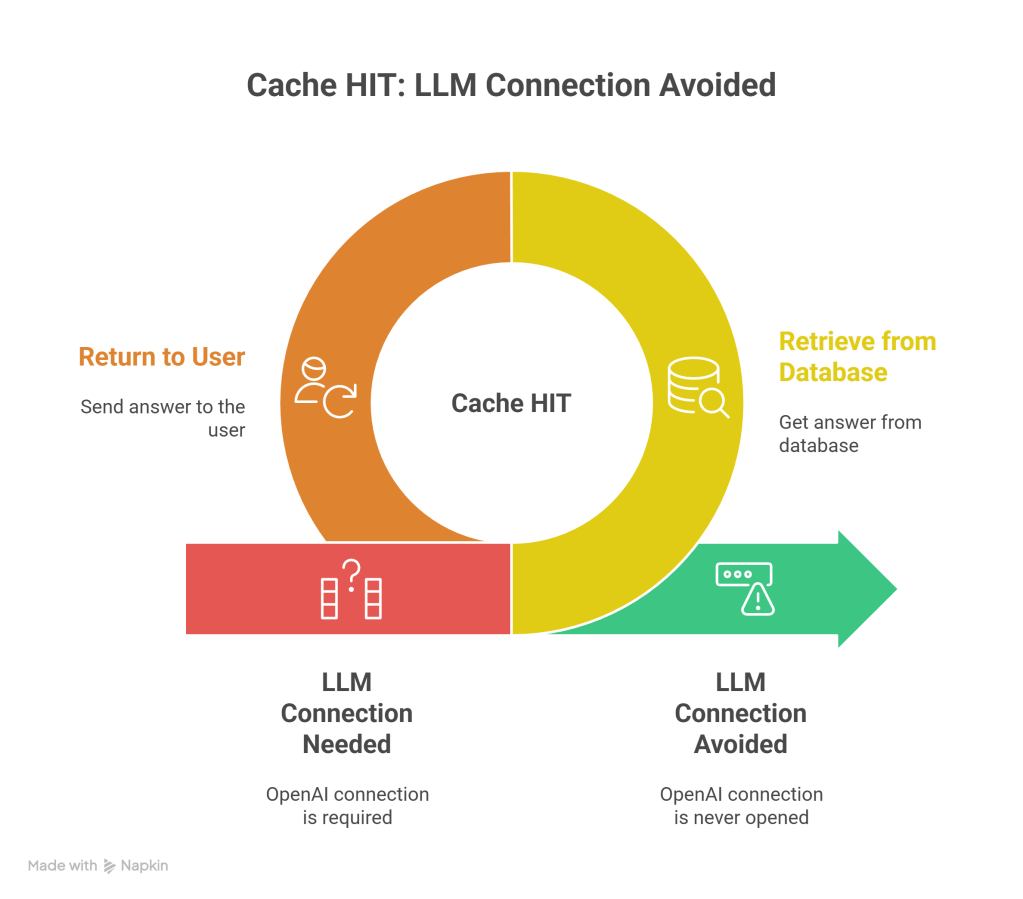
If the database says: “Yes, I found a match with 0.92 similarity. The stored answer is ‘Go to settings…'”
- Action: Your backend retrieves the string from the database.
- Action: Your backend returns that string to the user.
- Result: The connection to OpenAI (the LLM) is never opened.
- Input Tokens sent to LLM: 0
- API Latency: 0ms
Scenario B: Cache MISS (The Gate Opens)
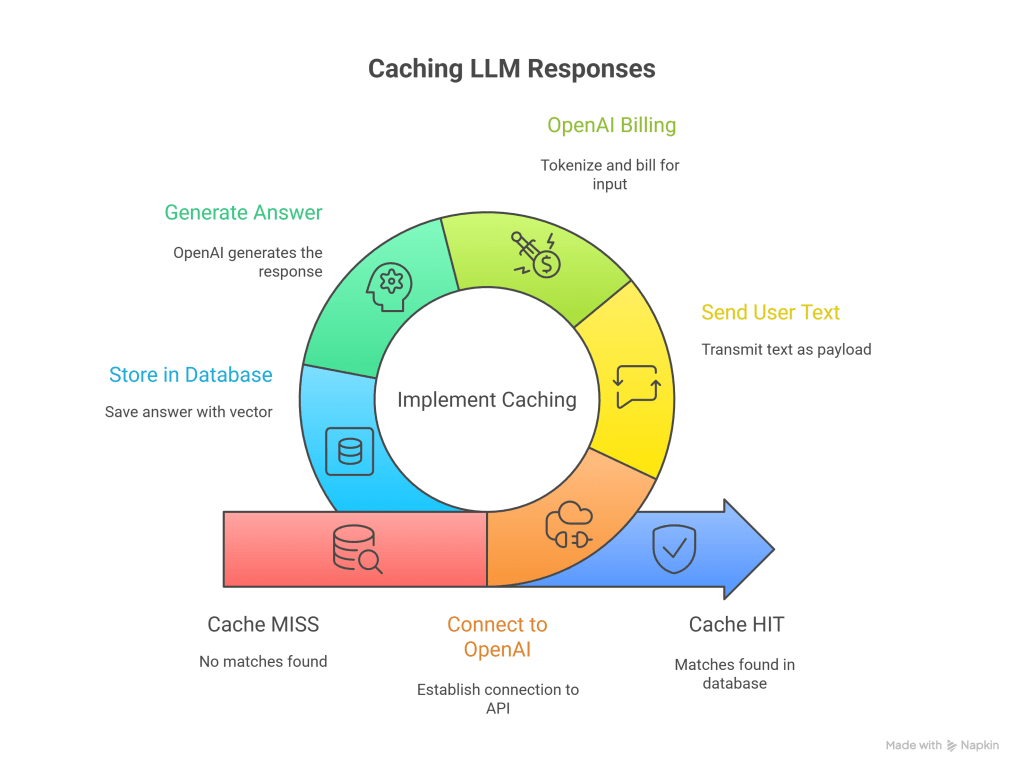
If the database says: “No matches found.”
- Action: Your backend creates a connection to
https://api.openai.com/v1/chat/completions. - Action: Your backend sends the user’s text as the payload.
- Billing Event: OpenAI receives the text, tokenizes it (Input Tokens), and bills you.
- Generation: OpenAI generates the answer (Output Tokens) and bills you.
- Storage (Crucial): Your backend receives the answer, saves it into the Vector Database (pairing it with the vector from Step 2), and then sends it to the user.
Summary Diagram
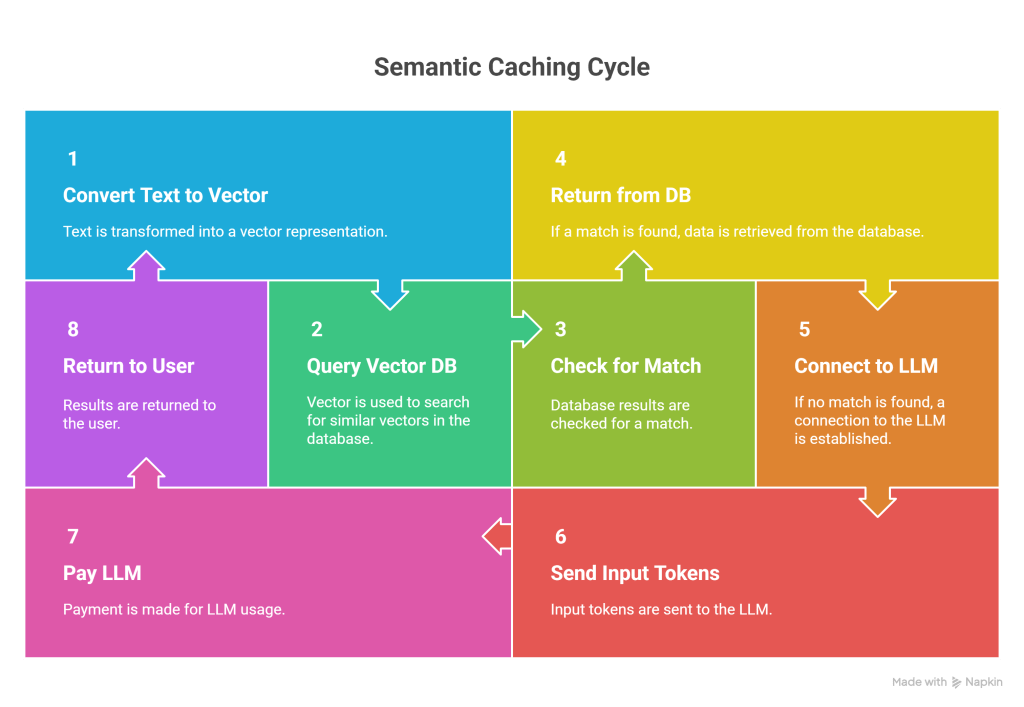
User Device │ ▼[ Your Backend Server ] <-- The "Bridge" │ ├── (1) Convert Text to Vector (Local Model) │ ├── (2) Query Vector DB (FAISS) │ │ │ ├── [ FOUND MATCH? ] ── YES ──┐ │ │ │ │ ▼ NO ▼ │ [ Open Connection to LLM ] [ Read from DB ] │ [ Send Input Tokens ] [ Input Tokens = 0 ] │ [ Pay $$$ ] [ Pay $0 ] │ │ │ └────────┴─────── RETURNING ───────────┘ │ ▼ User DeviceConclusion
Semantic caching is a game-changer for enterprise LLM applications. The key insight is understanding the 18% / 47% / 35% pattern:
- 18% exact duplicates: Traditional caching handles these.
- 47% semantic matches: Semantic caching unlocks these. ⭐
- 35% novel queries: Unavoidable costs.
By capturing both exact and semantic matches, you achieve a ~65% cache hit rate, translating to massive cost savings:
- 10,000 queries/day: Save $78/month
- 100,000 queries/day: Save $780/month
The implementation is straightforward, scales efficiently, and pays for itself immediately. Start with a single use case, measure results, and expand from there.
Discover more from SkillWisor
Subscribe to get the latest posts sent to your email.
 SkillWisor